Physical Address
304 North Cardinal St.
Dorchester Center, MA 02124
Physical Address
304 North Cardinal St.
Dorchester Center, MA 02124

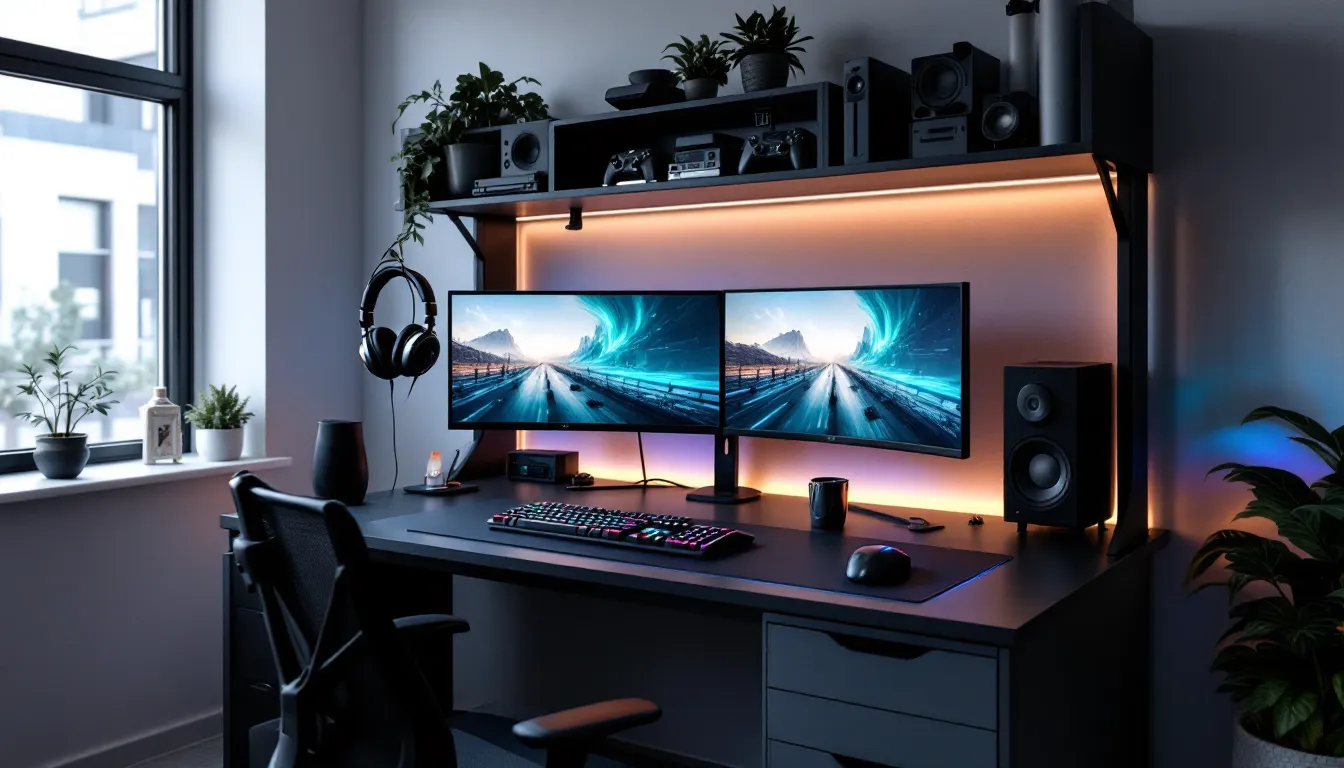
A gaming setup isn’t just about the GPU or the refresh rate anymore. The foundation of every high-performance station, whether you’re grinding ranked matches or streaming to thousands, is the desk. And while flat surfaces get the job done, they leave a critical dimension unused: vertical space.
That’s where a gaming desk with a hutch changes everything. It transforms chaotic peripheral sprawl into organized real estate, elevates monitors to ergonomic eye level, and routes cables like a proper build instead of a spaghetti nightmare. For gamers running multiple displays, streaming rigs, or extensive peripheral collections, a hutch isn’t luxury, it’s efficiency.
This guide breaks down what separates a solid gaming desk with hutch from overpriced particle board, which configurations actually work for modern setups, and how to avoid the mistakes that leave you cramped, uncomfortable, or stuck with unusable shelf spacing.
A gaming desk with hutch is a desk system that includes an overhead shelving or storage unit mounted above or integrated with the desktop surface. The hutch component typically features open shelves, closed cabinets, or a combination of both, creating vertical storage space for monitors, speakers, headphones, collectibles, and gaming accessories.
Unlike standard office hutches designed for books and paperwork, gaming-specific hutch designs account for modern needs: cutouts for monitor mounting, wider shelves for ultrawide displays, weight capacity for multi-monitor arms, and integrated cable routing channels. The best models treat the hutch as an active part of the gaming ecosystem, not just decorative storage.
Gamers need hutches because horizontal desk space has become a battlefield. Modern setups demand room for keyboard, mouse, mousepad (often extended), microphone arm, controller charging dock, drinks, and elbow clearance. Adding vertical storage reclaims that contested surface area while keeping essentials within arm’s reach. It’s the difference between a cramped, cluttered workstation and a setup that breathes.
The hutch also solves the monitor elevation problem. Standard desk height forces most users to tilt their necks downward to view displays, terrible for long sessions. A properly configured hutch raises monitors to natural eye level without requiring separate monitor stands or stacked Amazon boxes.
The primary advantage of a hutch is liberating desktop surface area by moving items upward. Headphones go on dedicated hooks. Controllers sit on shelves instead of rolling around the desk. Figurines, Funko Pops, and trophy collections find permanent homes instead of competing with your mousepad for space.
This vertical organization reduces visual clutter, which legitimately impacts focus during competitive play. When your peripheral vision isn’t catching stray cables or teetering energy drink cans, you maintain better concentration on the screen. The psychological effect of an organized space translates to measurable performance gains in sustained sessions.
Hutches with adjustable shelving adapt to changing gear. Upgrading from 24-inch monitors to 27-inch? Reposition the shelf. Adding a soundbar or RGB light strip? Create the clearance you need. Static configurations can’t evolve with your setup, but adjustable systems grow alongside your gaming ecosystem.
Proper monitor height isn’t just ergonomic theory, it’s the difference between neck pain after a three-hour session and sustainable marathon gaming. The ideal setup places the top third of your primary monitor at or slightly below eye level when sitting with proper posture.
A hutch with a monitor shelf achieves this elevation naturally without eating desk space with bulky stands. Many designs incorporate reinforced upper shelves rated for 50+ pounds, sufficient for dual 27-inch displays or a single ultrawide. Some premium models include VESA-compatible mounting plates integrated into the hutch structure, creating even cleaner installations.
Elevated placement also improves viewing angles for secondary monitors in multi-display setups. Stacking a second screen above your primary using the hutch framework creates a comfortable reference display for Discord, stream chat, guides, or system monitoring without the neck rotation required by side-by-side arrangements.
Cable management separates amateur setups from professional-looking stations. A quality gaming desk with hutch includes cable routing channels, grommets, and clips designed specifically for gaming peripherals’ thicker, braided cables. The vertical structure provides natural pathways to route monitor cables, USB hubs, and power strips behind and through the hutch framework.
Integrated management keeps cables organized and accessible, critical when you’re swapping peripherals for different games or troubleshooting connectivity issues. No more diving under the desk to trace which HDMI cable belongs to which monitor. Everything routes through visible, labeled channels that make adjustments straightforward.
Clean cable runs also improve airflow around equipment. Tangled cable masses trap heat and dust, gradually degrading performance in sensitive electronics. Proper routing through hutch channels maintains clearance around PCs, consoles, and power supplies, extending hardware lifespan and maintaining optimal thermals.
Desktop dimensions determine what fits and how comfortably you can play. For most gamers, the sweet spot starts at 55-60 inches wide and 24-30 inches deep. This accommodates a standard gaming keyboard (18 inches), a full-size mousepad (36 inches), and leaves clearance for speakers, drink, and elbow room.
Competitive FPS players using low-sensitivity settings need deeper desks, 30 inches minimum, to allow full arm sweeps without hitting walls or monitors. MOBA and RTS players can work with shallower surfaces since wrist-aiming dominates those genres. Consider your primary games’ physical demands when evaluating depth.
Weight capacity matters more than most spec sheets suggest. A desktop rated for 200+ pounds handles not just monitors and PC tower weight, but uneven distributed loads, leaning on the desk during intense moments, mounting heavy monitor arms to the edge, or placing speakers near corners. Desks rated below 150 pounds risk sagging over time, creating uneven surfaces that affect mouse tracking.
Material composition drives both capacity and longevity. Solid wood and high-grade engineered wood (like plywood cores with laminate surfaces) outperform particle board and MDF in every metric, weight handling, durability, and resistance to wear from mouse movement. Particle board is acceptable in budget builds but expect replacement within 3-5 years of regular use.
Hutch layout falls into three categories: open shelving, closed cabinets, or hybrid designs. Open shelving provides quick access and showcases gear aesthetics, perfect for RGB setups, collector displays, and frequently accessed items. Closed cabinets hide cable clutter, spare peripherals, and non-aesthetic storage like manuals and packaging.
The most versatile option combines both: closed lower cabinets for clutter and open upper shelves for displays and active equipment. This configuration balances aesthetics with practical storage capacity.
Shelf adjustability is non-negotiable in quality builds. Fixed shelf spacing becomes a limitation the moment you upgrade equipment. Look for designs using pin-and-hole systems or track-mounted shelves that reposition in 1-2 inch increments. This flexibility accommodates everything from compact bookshelf speakers to tall figurine collections without wasted vertical space.
Shelf depth also matters. Shallow 6-8 inch shelves work for controllers and headphones but can’t support monitors or speakers. Quality gaming hutches offer 10-14 inch shelf depths on primary equipment levels, providing stable platforms for substantial gear while maintaining enough clearance to prevent the hutch from feeling oppressive.
Basic cable management means a single grommet hole. Professional-grade systems include vertical cable channels running up the desk’s rear corners or through the hutch side panels, rubber-lined grommets at multiple desk levels, and integrated clips or velcro straps within those channels.
Look for designs with cable access points at both desktop level and mid-hutch height. This allows clean routing for monitor cables without draping them across open space or forcing them through tight corners that stress connectors. Premium models incorporate removable cable covers that hide routed cables completely while remaining accessible for adjustments.
Some 2026 designs include built-in USB hubs and power strips mounted within the hutch structure. These eliminate the external hub clutter and provide convenient charging ports for controllers, phones, and wireless peripherals without cable runs back to your PC or wall outlets. Verify that integrated hubs use USB 3.2 or better, older USB 2.0 integrations bottleneck modern peripherals.
Material choice determines whether your desk lasts five years or fifteen. Solid wood, hardwoods like oak or maple, offers maximum durability and weight capacity but commands premium pricing. It handles heavy loads, resists surface wear, and can be refinished if damaged.
Engineered wood with quality construction (plywood core with hardwood veneer or high-pressure laminate) delivers 80% of solid wood performance at significantly lower cost. It provides excellent stability, good weight capacity (150-250 pounds typically), and requires less maintenance than solid wood. This is the sweet spot for most gaming desk investments.
Particle board and MDF populate budget desks under $300. They’re functional initially but degrade faster under constant use. The surface laminate chips more easily, screw holes strip if you disassemble and reassemble, and sagging becomes visible within 2-3 years under heavy monitor setups. Acceptable for temporary setups or light use, but not for long-term investments.
Metal frame construction adds significant durability. Steel or aluminum frames supporting wood surfaces combine weight capacity with stability, reducing desk wobble during intense gaming sessions. Many competitive gamers prefer monitor stability in metal-frame designs since even minor desk movement translates to on-screen image shake during fast mouse movements.
Start with precise room measurements, not eyeballing. Measure the wall space you’re allocating: width, depth from wall to expected chair position, and ceiling height (hutch clearance matters). Add 36-48 inches behind the desk for chair movement and getting in/out comfortably, more if you use a racing-style gaming chair with heavy recline.
For corner installations, measure both wall segments and note the corner angle. Not all corners are true 90-degree angles, especially in older buildings. L-shaped desks with hutches require accurate angle measurements to fit flush. Some designs include adjustable corner pieces that compensate for minor angle variations.
Consider door swing paths, window placement, and power outlet locations. Desks blocking door opens are non-starters. Windows behind monitors create glare problems during daytime gaming, if unavoidable, factor in blackout curtain costs. Outlet placement determines whether you’ll need extension cords or power strips, and how you’ll route those cables.
Measure your current and planned equipment. Lay out monitors, PC tower, speakers, and peripherals on paper or digitally before purchasing. A 60-inch desk sounds spacious until you realize three 27-inch monitors side-by-side span 69 inches without bezels. Account for actual dimensions, not just desires.
Gaming desk aesthetics split into several dominant styles in 2026. Industrial/tech designs feature metal frames, tempered glass surfaces, and angular lines, complementing RGB-heavy setups and exposed hardware builds. These maximize the “command center” vibe many PC gamers chase.
Minimalist/modern styles use clean lines, neutral colors (black, white, gray), and hidden storage. They photograph well for streaming backgrounds and suit gamers wanting setups that blend into adult living spaces rather than screaming “gamer den.” These work particularly well in shared spaces or apartments where aggressive gaming aesthetics clash with overall décor.
Wood/traditional styles with warm tones and classic furniture construction appeal to gamers preferring timeless aesthetics over trend-chasing. These age better visually, what looks cutting-edge today feels dated in five years, but quality wood furniture remains attractive indefinitely.
Match hutch style to your monitor setup aesthetic. If you’re running RGB everything with underglow and bias lighting, an open-shelf hutch showcases that investment. If you prefer clean, minimal setups with hidden cables and discrete gear, closed cabinets and cable covers maintain that aesthetic. The desk either complements or fights your overall setup visual language, choose intentionally.
L-shaped configurations dominate multi-purpose gaming spaces because they maximize corner real estate while providing separate zones for different activities. The primary leg accommodates gaming monitors and peripherals, while the perpendicular leg serves as workspace for creative projects, secondary PC/console, or just spreading out when not gaming.
Corner hutch placement on L-desks typically caps the primary gaming section, keeping equipment storage directly above active workspace. This configuration works exceptionally well for streamers running dual PC setups, gaming rig on one leg, streaming PC and equipment on the other, with the hutch organizing cameras, lighting controllers, and audio interfaces.
The corner junction in quality L-desks supports heavy equipment. Many designs reinforce this area specifically for PC tower placement or mounted monitor arms serving both desk sections. Verify corner weight ratings separately from general desktop capacity, some cheaper models weak-point at the junction.
Drawback: L-desks demand significant floor space. Even compact models occupy 100+ square feet when accounting for chair movement. They’re room-dominant furniture, not supplemental pieces.
Straight desks with hutches spanning the entire width offer maximum frontal workspace and symmetrical organization. This configuration suits ultrawide monitor setups, triple-monitor arrays, or gamers who frequently spread reference materials, controllers, and peripherals across the desk while playing.
Full-width hutches create impressive visual impact and provide the most vertical storage capacity. The continuous overhead structure allows for integrated lighting strips that illuminate the entire desktop evenly, popular for streaming backgrounds and content creation. Many 2026 models incorporate smart lighting with addressable RGB that syncs with on-screen content or system performance.
This configuration offers the most straightforward cable management since all routing follows parallel paths along the desk rear. No corner angles to navigate or junction boxes to hide, cables run straight back and up through vertical channels.
Best for: Single large display or triple-monitor gamers, streamers prioritizing background aesthetics, and anyone wanting maximum desk surface without room for L-shaped footprints.
Modular systems represent the newest evolution in gaming desk design, components that connect in various configurations, allowing customization based on specific needs. Buy the base desk now, add hutch modules later. Start with a corner hutch, expand to full-width as your setup grows.
Quality modular systems use standardized connection points and matching materials across all components, ensuring structural integrity and aesthetic consistency as you expand. Premium brands offer digital planning tools that model your space and suggest optimal configurations before purchase.
Flexibility extends to shelf arrangement within hutch modules. Some systems offer interchangeable components, swap a closed cabinet for open shelving, replace standard shelves with monitor platforms, or add lighting modules between existing shelves. This adaptability future-proofs your investment against changing gaming trends and personal preference evolution.
Tradeoff: Modular systems typically cost 20-30% more than equivalent fixed designs due to the engineering required for standardized connections and structural integrity across configurations. You’re paying for flexibility, worthwhile if you anticipate setup evolution, questionable if you know exactly what you want long-term.
Primary monitor positioning follows the 20-28 inch distance rule: the screen should sit approximately an arm’s length away when you’re seated with proper posture. For most adults, this places the monitor 20-28 inches from eyes. Closer causes eye strain: farther reduces immersion and forces leaning forward, compromising posture.
Vertical positioning places the top third of your display at eye level when looking straight ahead. This neutral head position reduces neck strain during extended sessions. If using the hutch to elevate monitors, adjust shelf height accordingly, most users need the monitor base 4-8 inches above desk surface, depending on monitor size and personal height.
Multi-monitor setups require angle consideration. Secondary displays should angle 20-30 degrees inward toward your seating position, reducing head rotation needed to view them. The hutch structure helps here, mounting arms to elevated shelves creates natural downward viewing angles that complement the inward tilt.
Many competitive players reference optimal positioning configurations to match what works for professional players in their primary game genre. While personal comfort varies, pro standards provide tested starting points for FPS, MOBA, and RTS ergonomics.
Peripheral organization follows a frequency-of-use hierarchy. Daily essentials, headphones, primary controller, microphone, deserve prime real estate on easily accessible hutch shelves or desk-mounted hooks. Less frequent items like backup controllers, cable adapters, or specialty peripherals can occupy closed cabinets or lower shelves.
Headphone placement typically works best on dedicated hooks mounted to hutch sides or under-shelf mounting systems. This keeps them off the desk surface, prevents cable tangling, and displays premium headsets as part of your setup aesthetic. Avoid laying headphones flat, prolonged pressure warps earpads and headbands over time.
Controller organization depends on platform. Console gamers benefit from charging stations placed on mid-level hutch shelves, high enough to avoid desk clutter, low enough to grab quickly between matches. PC gamers often keep a controller in a desk drawer for specific titles requiring analog input, with primary mouse/keyboard occupying surface space.
Cable organization uses the hutch’s vertical structure. Route charging cables up through desk grommets to hutch-mounted power strips, creating clean vertical paths instead of horizontal cable sprawl across the desktop. Use velcro straps or cable clips at 12-inch intervals to maintain organized routes that resist tangling during equipment swaps.
Integrated lighting transforms a functional desk into an immersive gaming environment. Bias lighting behind monitors reduces eye strain by matching ambient light levels to screen brightness, proven to reduce fatigue during long sessions. LED strips mounted to the hutch rear create this effect cleanly without visible hardware.
Under-shelf lighting illuminates the desktop workspace without creating monitor glare. This works particularly well for streamers since it lights your hands and keyboard for camera capture without washing out facial lighting. Adjustable color temperature (2700K-6500K) lets you match lighting to game mood or productivity mode, warmer tones for relaxed gaming, cooler for competitive focus.
RGB synchronization in 2026 extends beyond individual components to whole-setup ecosystems. Many gaming desks now integrate addressable RGB that syncs with major software platforms (Razer Chroma, Corsair iCUE, ASUS Aura). This creates cohesive lighting that responds to in-game events, system performance, or audio reactivity.
When designing lighting placement, follow practical setup tutorials that emphasize function alongside aesthetics. The goal is enhancing the gaming experience, not creating distracting light shows that pull attention from screens or strain eyes with excessive brightness.
The biggest mistake is buying based on current equipment only. Your setup will evolve. That 24-inch monitor becomes 27 or 32 inches. Single monitor expands to dual or ultrawide. Desk space you think is sufficient today feels cramped after your next upgrade. Buy for where your setup is headed, not just where it is.
Ignoring weight capacity until it’s too late. Many attractive desks in the $200-300 range use thin particle board and lack structural support for heavy monitor arms, multiple displays, or robust speaker systems. Weight limits aren’t suggestions, exceeding them causes gradual sagging that ruins mouse surface flatness and eventually leads to catastrophic failure. Invest in proper capacity upfront.
Overlooking assembly complexity frustrates buyers after purchase. Gaming desks with hutches often involve 2-4 hours of assembly with 50+ parts and unclear instructions. Read assembly reviews specifically. Some manufacturers provide excellent instructions and pre-drilled holes: others ship incomplete hardware or vague diagrams that make assembly needlessly difficult. If you’re not comfortable with furniture assembly, factor in professional assembly costs ($100-200 typically).
Forgetting about disassembly and moving. That massive L-shaped desk with attached hutch might fit your current room perfectly, but will it navigate your doorway or stairwell if you move? Large gaming desks often exceed doorway widths when fully assembled. Verify whether the desk breaks down into moveable sections or requires complete disassembly. Some designs use permanent joining methods that essentially make them one-room-forever furniture.
Skipping cable management features to save $50-100 seems reasonable until you’re living with the consequences. Desks without proper grommets, channels, or routing solutions force improvised cable management using zip ties and adhesive clips that damage surfaces or fail over time. The marginal cost of integrated management is worth every dollar in reduced frustration and cleaner aesthetics.
Choosing aesthetics over functionality creates buyer’s remorse. That glass-topped desk looks incredible in product photos but shows every fingerprint, creates mouse tracking issues on reflective surfaces, and offers no cable routing options. RGB lighting strips look amazing until they create monitor glare during dark scenes. Prioritize function first, then find the most attractive option within functional requirements.
Regular maintenance extends desk lifespan significantly. Weekly dusting of hutch shelves and desktop surface prevents particle buildup that scratches surfaces during mouse movement or equipment repositioning. Microfiber cloths work best, they capture dust instead of redistributing it.
Monthly deep cleaning involves removing peripherals and cleaning surfaces with appropriate materials. Wood desks need wood-safe cleaners that won’t strip finish: laminate surfaces handle general multi-surface cleaners. Avoid excessive moisture on particle board or MDF, it causes swelling and delamination over time. Clean electronics from hutch shelves to maintain proper airflow around stored equipment.
Inspect structural integrity quarterly. Check mounting screws for loosening, particularly on hutch attachments and monitor arm mounts. Vibration from speakers, enthusiastic mouse movement, and normal use gradually loosens hardware. Tighten screws before looseness causes structural damage or instability. This 10-minute check prevents 95% of structural failures.
Upgrade opportunities emerge as your setup evolves. Modular additions like adding LED lighting, mounting a power strip, or installing better cable management accessories refresh desk functionality without replacement costs. Many gamers add monitor arms after initial setup, discovering that freeing desk space by removing monitor stands dramatically improves usability.
Surface protection matters for longevity. Desk mats not only provide better mouse surfaces, they protect the underlying desk from spills, scratches, and wear patterns. Extended mouse mats covering most of the desktop surface protect against accidental impacts from controllers, drinks, or equipment placement. Quality mats cost $30-60 but prevent hundreds in damage over the desk’s lifetime.
When considering full replacement, evaluate whether component upgrades extend functionality sufficiently. If the desk structure remains solid but shelving configuration no longer works, some manufacturers sell replacement hutch modules. If weight capacity limits upgrades but the surface remains functional, reinforcement brackets or replacing the desktop while keeping the frame extends life at fraction of replacement cost.
A gaming desk with hutch isn’t just furniture, it’s the infrastructure supporting everything else in your setup. Getting it right means your monitors sit at proper height, your cables route cleanly, your peripherals have dedicated homes, and your desk surface stays clear for actual gaming instead of cluttered with displaced accessories.
The investment matters because you’ll spend thousands of hours at this desk. Choosing based on proper dimensions, adequate weight capacity, quality materials, and thoughtful cable management pays dividends in comfort, performance, and longevity. The wrong desk creates ongoing frustration: the right one disappears from awareness, letting you focus entirely on gaming.
Build for where your setup is going, not just where it is today. That extra width, better weight rating, and adjustable shelving seem like overkill now but become essential as your gaming ecosystem grows. The desk that accommodates today’s single monitor and tomorrow’s triple-screen ambitions is the desk you’ll still love years from now.
